


Nextcloud.com and Laboratory Informatics
Introduction
The purpose of this article is to review the Nextcloud product and its potential application to laboratory work. Nextcloud describes itself as a hub where users can collaborate to carry out their work. Figure 1 shows some of the key functions from the user’s point of view; of course, the administrator would see a lot more detail.
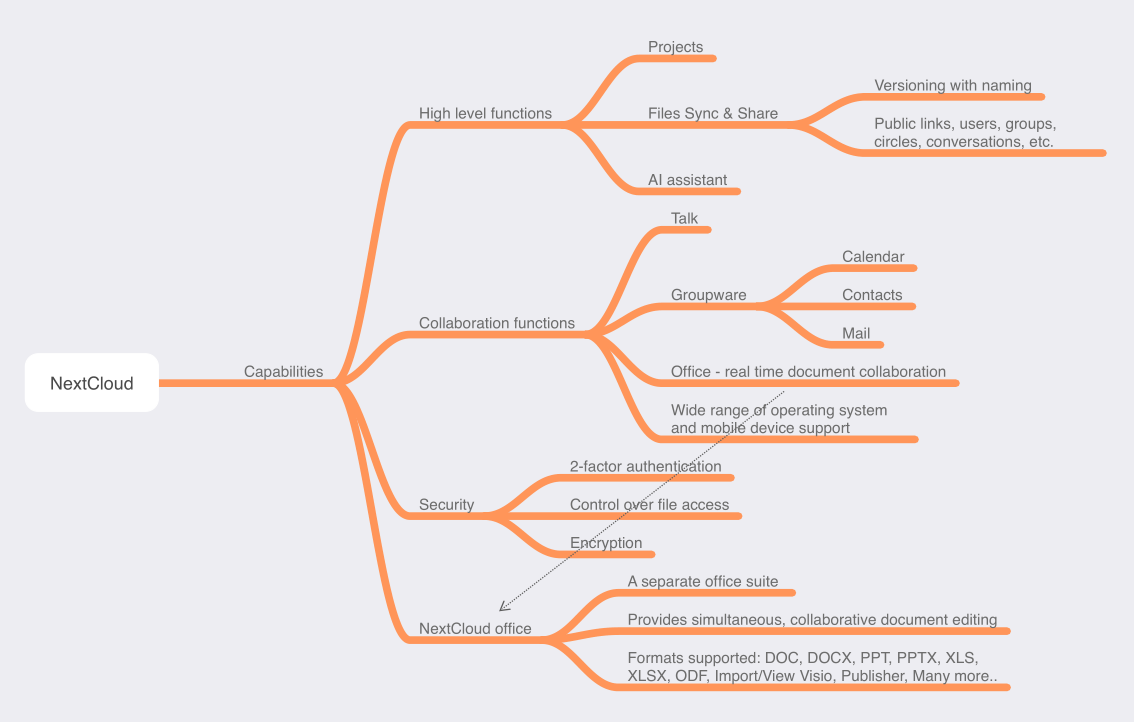
Nextcloud is a layered product on top of existing operating systems and is supported by Windows, macOS, Linux, IOS, and Android systems. It can be installed both as an on-premises system and as a cloud-based offering. It is available free of charge to home users, students, and small organizations with limited support, while enterprise versions offer much more robust support at a cost.1 You can purchase it preloaded on hardware platforms.2 The basic enterprise cost is 36 euros (US $39)/user/year, climbing to 95.5 euros (US $103.49)/user/year for the premium version.1
Nextcloud offers a lot of capability, as will be described shortly, but at a cost beyond license prices. This is intended for something other than a casual office suite user even though it describes itself as suitable for home, student, etc. The open-source software relies on users being knowledgeable in internet technologies such as WebDAV3, LDAP4, CalDAV5, and CardDAV.6 It relies heavily on third-party applications to manage the system, carry out user requests, and support multiple platforms such as Windows, IOS, macOS, Android, etc. (Outside the references, the technologies mentioned are also described in more detail on Wikipedia.)
This is not an “out-of-the-box” product for a small organization that “just wants something that works.” This sophisticated tool offers useful functions for an organization large enough to afford the cost of support that should include the IT organization. There is an active user community that provides support accessible through the Nextcloud site, as well as Reddit.
There is a downloadable, ready-to-install version available called Nextcloud All-in-One (or Nextcloud AIO) available on Docker.com7, which, according to the vendor, includes:
• Nextcloud
• Nextcloud Office
• High-performance backend for Nextcloud Files
• High-performance backend for Nextcloud Talk and TURN-server
• Nextcloud Talk Recording-server
• Backup solution (based on BorgBackup)
• Imaginary (for previews of heic, heif, illustrator, pdf, svg, tiff, and webp)
• ClamAV (Antivirus backend for Nextcloud)
• Fulltextsearch
Docker is a virtualization service that delivers OS-level virtualization in containers, which is not too different from VMWARE. This format permits tailoring of the system, making it easier to install. Interestingly, at least one vendor has pre-packaged Nextcloud systems, which will become important later in this document. The containerized offering is pre-set so it solves some of the support issues.
Nextcloud is focused on collaboration activities without regard to specific industrial/business applications. Its emphasis is on people-to-people interactions without any consideration for real-time or time-critical communications. (Some software vendors consider “real-time” action-response sequences without considering time intervals between them. In laboratory work, “real-time” is more stringent, particularly at the instrument and sample preparation [via robotics] level.) This is important in lab work if the user is considering direct instrument input into a spreadsheet for example. The details of the product offering are described on the website. The videos are worth watching.
High-level functions
Security
Nextcloud has extensive security built into the system. In addition to username/password controls, it supports two-factor authentication and control over folder and file access, including creating/uploading files, modifying a file’s contents, deletion, downloading, and synchronizing the file with desktop and mobile clients. This is an important feature since it limits (under admin control) what can happen to files, and thus maintains data/information integrity.
Project, folder, and file organization
Material can be organized by projects (with access controls) that contain files that can be synchronized across users, as well as shared. Sharing has access to public links, users, groups, circles, conversations, and so on. One useful feature is file versioning. The following is from the user manual:
Nextcloud supports a simple version control system for files. Versioning creates backups of files, which are accessible via the Versions tab on the Details sidebar. This tab contains the history of the file where you can roll back a file to any previous version. Changes made at intervals greater than two minutes are saved in data/[user]/files versions. Versions can be named and compared side-by-side to make it easier to spot changes.
The versioning facility has limitations. For example, an application can open a document, be modified, and then closed. Nextcloud will recognize that the file has changed but not what the changes are. Determining that is a manual process.
The product also has its own takes on “audit trails.”8 that, coupled with versioning, sounds useful for a regulated environment. However, the audit trail is at the system level, noting changes in system characteristics, file permissions, controls, etc.; it doesn’t apply to the contents of a file. It wouldn’t be useful in spreadsheets that contained data; you might know that something changed and by visual inspection determine what, but it isn’t the detailed level requirement by regulatory guidelines (i.e., who did it, what changed, why, what was the previous entry, who authorized it, and when). Some of that detail might be teased out, but not at a level sufficient to satisfy an inspection either in terms of content or timeliness.
AI Assistant
The AI Assistant is an interesting tool, at least according to the Nextcloud press releases and documentation. According to the vendor, the AI Assistant is a language model that the user can train with their own material, with sufficient security to ensure that sensitive material will not leak outside the system.9–10
Depending on confidentiality and security concerns, a lab or an entire organization could train the AI on organizational reports, lab methods, procedure descriptions, and anything that can be reduced to electronic form. Once there, it is accessible for searching and analysis. This could help solve a problem companies have with employees leaving. When they leave a company, whatever they know goes with them, particularly concerning past work. If a company diligently commits reports, memos, notebooks, etc., to electronic form, at least that material can be retrieved and used regardless of age. The AI becomes an enduring, expandable, accessible corporate memory. The key to its successful use is getting people to document their work in electronic form in sufficient detail to be useful. One concern is that people may balk at doing this because it would make them expendable; the same concerns are cropping up in other industries.
Office Suite
The office suite of products is based on Collabora11 and is an essential factor in the system’s utility. The demonstrations on the Nextcloud site of people working simultaneously on a document are based on the office suite and not on systems like Microsoft Office; it isn’t clear that multi-user functionality will extend to those products. As noted in Figure 1, the office suite supports many file formats, including DOC, DOCX, PPT, PPTX, XLS, XLSX, ODF, Import/View Visio, Publisher, and “many more,” though not specified by Nextcloud.
Application to laboratory work
The Nextcloud system should have valuable applications for laboratory work. The project/folder system with versioning and security would improve record keeping, a problem in many labs, particularly startups and small facilities. However, they would need access to IT support or use a packaged version (that would need to be created as a layered product) that is easy to install and could be maintained remotely. For example, I worked with one lab with an informal management structure; people managed their data and information as they saw fit. One problem was that samples were analyzed according to a particular method. Everyone had their own copy of the method but different versions, which made comparing results problematic due to procedure variations. Nextcloud could enforce better procedural management.
The communications facilities would go a long way to keeping everyone up-to-date on lab work, changes in methods, procedures, lab management, etc. Office suite applications would make generating reports (individually and collaboratively) easier and have them included in the AI Assistant to improve their utility.
Applying project, folder, and file organization to the lab
Individual projects could maintain their own data structures with access controls if needed. (Note: The following material was written before the concept of organizational memory and electronic notebooks were considered12; it should be viewed now as an alternative approach). The folder/file structure could be organized so that there would be separate folders/subfolders/calendars for:
- Instruments
o Maintenance status;
o Calibration files/curves;
o Scheduling (calendar app); and,
o Recorded results and raw data files. - Inventory
o Equipment; and,
o Reagents (with metadata such as age, health information, disposal, assay verification, etc.). - Methods (particularly useful to ensure everyone is using the current methods)
o Descriptions;
o Validation records;
o Revision history;
o Current versions; and,
o Old versions (versioning function with side-by-side comparison would be useful here). - Documents
o Administrative reports;
o Personnel records with access controls;
o Research reports;
o Schedules;
o Proposals;
o Grant requests;
o Financial records with access controls. - Projects, with access controls as needed
o Project description;
o Project history;
o Results with corresponding data and information;
o Reports; and,
o Budget/financial records.
The facilities within Nextcloud would go a long way toward enforcing record-keeping disciplines with access controls, and communications. The collaborative capabilities for report writing and other functions would seem to invite a low-cost approach to things such as inventory management systems and laboratory information management systems (LIMS). While they might be attractive to a cash-strapped lab, it is at best a short-term measure. Trying to mimic a commercial system would be cost-prohibitive and lack the integration of functions those systems provide and support for things like barcode reading and other functions. There is also the cost of development, application software support, and Nextcloud support, all ongoing costs which could be significant.
Support for electronic signing
Another factor for labs to consider is document signing/witnessing facilities and an adequate audit trail facility, as noted earlier. A 2021 press release13 stated that integrated PDF signing with DocuSign, EIDEasy, and LibreSign had become available. The issue of an electronic signature is an important one, and that issue was being raised by the Nextcloud community into 2023.14 In addition, products such as Microsoft’s e-signing function could be useful if users wanted to work within that set of products, but it would need to be tested in a collaborative environment. Beyond that, Make.com describes their solution to incorporating DocuSign facilities with Nextcloud.15 As of February 2024, Nextcloud now appears to offer an Electronic Signatures app that provides both qualified and simple electronic signatures.16
Packaged distribution of Nextcloud configurations
Given the example provided by Docker, noted earlier, a container-based distribution of Nextcloud, a file structure for lab use, and templates for document and spreadsheet functions, with an optional LIMS (depending on the lab economics) could be put together to give a lab a running start on organizing their laboratory informatics structure and practices. A container-based solution would permit setting several system characteristics, such as the various internet-based sharing functions, and minimizing support requirements.
Out-of-the-box, the capabilities offered by Nextcloud are a big step up from paper-based and basic office suite systems, particularly if you factor in the AI Assistant. However, there are other possibilities.
In closing…
Nextcloud is a potentially useful solution to laboratory informatics. It removes the operating system from being a limiting factor in conducting lab work, provides levels of security missing in popular operating systems (except UNIX), and includes tools for personnel communications that could improve the ability of labs to carry out their work. It would make a useful solution to lab-wide informatics implementations augmented by LIMS/SDMS/LES and IDS tools specific to a lab’s needs.
Additional work would be needed to prove out the concepts noted in this document.
References
1 Nextcloud Plans and Pricing. Nextcloud GmbH. Accessed 10 April 2024.
2 Nextcloud on Devices. Nextcloud GmbH. Accessed 10 April 2024.
3 Kimball, J. (01 July 2021). WebDAV: What it is, where it turns up, and its alternatives : Updated 2024!. Comparitech Limited. Accessed 10 April 2024.
4 Bhargava, R. (11 August 2021). What Is LDAP? The Ultimate Guide. JumpCloud, Inc. Accessed 10 April 2024.
5 CalDAV – What’s behind the network protocol?. IONOS Digital Guide. IONOS, Inc. 09 March 2020. Accessed 10 April 2024.
6 CardDAV. IONOS Digital Guide. IONOS, Inc. 20 March 2023. Accessed 10 April 2024.
7 nextcloud/all-in-one. DockerHub. Docker, Inc. 04 April 2024. Accessed 10 April 2024.
8 NexCloud configuration – Logging. Nextcloud Server Administration Guide. Nextcloud GmbH. 2024. Accessed 10 April 2024.
9 Poortvliet, J. (03 April 2024). Nextcloud releases Assistant 2.0 and pushes AI-as-a-Service. Nextcloud GmbH. Accessed 10 April 2024.
10 Artificial Intelligence. Nextcloud Server Administration Guide. Nextcloud GmbH. 2024. Accessed 10 April 2024.
11 Collabora Online. Collabora Ltd. 2024. Accessed 10 April 2024.
12 Liscouski, J. (April 2024). LII:Organizational Memory and Laboratory Knowledge Management: Its Impact on Laboratory Information Flow and Electronic Notebooks. LIMSWiki. Accessed 10 April 2024.
13 Poortvliet, J. (06 July 2021). Nextcloud Hub 22 is the digital office optimized for the post-pandemic workplace. Nextcloud GmbH. Accessed 10 April 2024.
14 crobarcro. (08 October 2020). Electronic Signature App. Nextcloud Forums. Nextcloud GmbH. Accessed 10 April 2024.
15 Connect DocuSign and Nextcloud integrations. Celonis, Inc. 2024. Accessed 10 April 2024.
14 Electronic Signatures. Nextcloud GmbH. February 2024. Accessed 10 April 2024.


